




Technology problems in business reduce productivity, slow customer service, increase cybersecurity risk, and create unnecessary costs. Common IT issues such as slow computers, login failures, cloud configuration mistakes, and network outages can disrupt daily operations and prevent employees from doing their jobs efficiently.
Most organizations don’t even realize they have an IT problem until it starts affecting people.
A billing clerk can’t send invoices because the accounting software freezes. A project manager joins a client meeting and can’t access an important file. A receptionist apologizes for the third time that day because the scheduling system is running slowly.
These moments seem small on their own, but they add up quickly. Employees become frustrated, customers wait longer, and leaders are left wondering why the same issues keep coming back.
In 2026, technology problems aren’t just technical inconveniences. They affect productivity, service quality, security, and business growth.
“When technology fails, most people focus on the system that’s down,” says Paul White, Vice President of Sales at ACC Technical Services. “But the bigger question is what work stopped because of it. Who is waiting? What customer experience was affected? What risk was created while people found a workaround?”
Common Technology Problems That Disrupt Business Operations
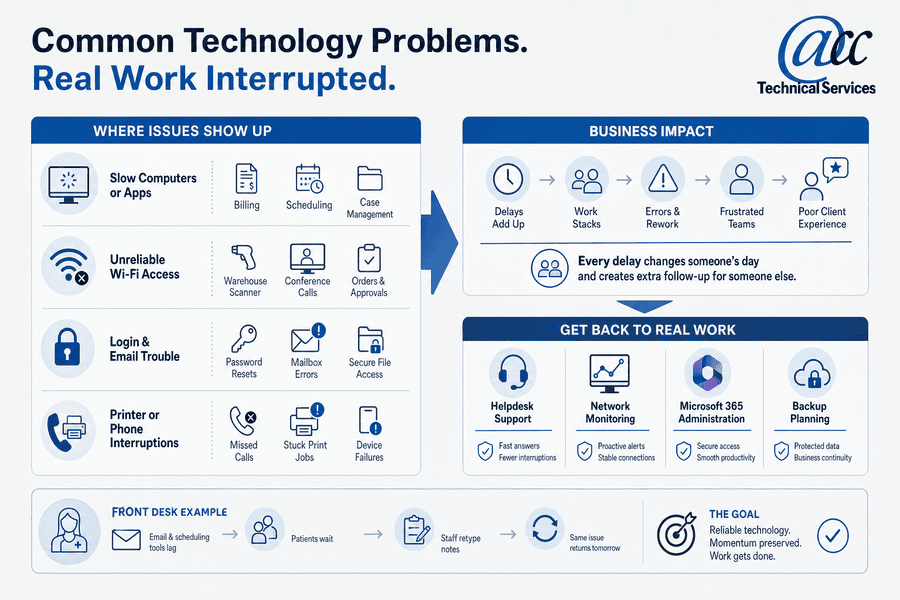
The first signs of ongoing IT issues usually appear where people are already under pressure: a ticket queue, closing checklist, shipping desk, or client approval. These technology issues in business matter because every delay changes someone’s day and creates extra follow-up for someone else. Repeat issues often point to weak upkeep or poor documentation, aging equipment, unclear ownership, or unmanaged cloud settings.
Key examples of this include:
- Slow computers or apps: Employees sit waiting for billing and scheduling screens to load when they should be helping customers, processing orders, or moving projects forward. Invoices, appointments, and file updates move later.
- Unreliable Wi-Fi access: A warehouse scanner drops offline or a conference room call freezes. Orders, approvals, or customer conversations stay unfinished.
- Login and email trouble: Password resets and mailbox errors delay client replies, secure file access, and manager sign-offs.
- Printer or phone interruptions: Missed calls, stuck print jobs, and device failures frustrate clients and create avoidable support tickets.
Employees end up repeating work they’ve already done, re-entering information, and spending time on tasks that should have been completed the first time. These disruptions aren’t usually caused by one catastrophic failure. More often, they’re the result of small technology issues that have been allowed to accumulate over time.
How IT Problems Increase Business Costs
Most business leaders aren’t worried about the cost of a support ticket. They’re worried about the hour their team couldn’t work, the customer who didn’t get a response, or the project that fell behind schedule.
That’s why the real cost of an IT issue is often much higher than the invoice for fixing it.
Leaders should look beyond the first ticket because the repair bill rarely shows the full cost. Large-enterprise research puts the scale in context, with unplanned downtime costing the world’s 2,000 biggest companies an estimated 600 billion dollars a year.
Smaller organizations feel the same pattern.IT problems in business often show up in the workflow before they show up in the budget.
The true cost of technology problems in business extends beyond repair expenses. Lost productivity, delayed customer service, employee frustration, cybersecurity incidents, and missed revenue opportunities often create a much larger financial impact than the original IT issue itself.
The following list demonstrates how IT problems lead to increased business costs.
- Lost staff time: Five-minute slowdowns across a team turn into hours of waiting, retyping, and chasing status updates.
- Interrupted revenue work: Outages can stop billing, sales follow-up, production runs, or partner approvals.
- Weaker client service: A team waiting on secure file access responds later during a deadline week. Clients notice.
- Higher security exposure: Weak passwords, phishing, missing updates, and unmanaged devices increase risk while staff look for workarounds.
- Unclear accountability: Vendors blame each other, tickets bounce around, and no one owns the fix.
What Causes Common IT Problems in Business?
Many outages begin with ordinary settings no one has reviewed in months. Modern businesses rely on platforms such as Microsoft 365 and Microsoft Azure to support communication, collaboration, file storage, security, and business applications. Without ongoing management, configuration drift, permission sprawl, and outdated settings can create operational disruptions and increase security risks. These platforms need active management as roles, locations, and systems change.
Hidden causes matter because common technology problems often start before anyone opens a ticket. Verizon reported that 68% of breaches in its 2024 Data Breach Investigations Report involved a non-malicious human element, so clear setup and routine review matter.
Key examples of this include:
- Unmanaged user access: People keep access after role changes or departures, leaving files and systems exposed.
- Confusing cloud settings: Microsoft 365 email, Teams, SharePoint, and OneDrive need clear setup so staff know where work belongs.
- Missed updates: Patching means regular software and security updates for tools, devices, and applications.
- Weak backup planning: Many organizations assume their data is protected until they actually need to recover it. The real test isn’t whether a backup exists. It’s whether critical files can be restored quickly when they’re needed most.
Proactive management starts with the root causes staff rarely see. Useful capability areas include access management, update schedules, backup testing, and cloud cost review.
Related Resources
- The Benefits Of Managed IT Services For Steadier, Safer Operations
- Why Managed Services Matters When IT Costs, Tickets, and Risk Keep Climbing
- Types Of Managed Services: What To Compare Before Choosing an MSP
- Choosing a Managed Services Provider: Your Guide to Business Resilience
- Managed IT Services Pricing: What Your Monthly IT Budget Should Actually Cover
Common Technology Problems: You’re Not Alone
If any of these challenges sound familiar, you’re not alone. Many organizations spend months—or even years—working around recurring technology issues because they seem manageable at the moment.
A slow application here. A password problem there. A file that takes a little too long to open. Over time, those small frustrations become part of the daily routine.
The problem is that what feels like a minor inconvenience to one employee can have a cumulative impact on productivity, customer service, and team morale across the organization. The good news is that most recurring IT issues have identifiable root causes and can be addressed with the right processes, oversight, and support.
How To Prevent IT Problems In Business
Process change is hard when staff are serving clients, closing books, shipping orders, or answering public requests. Still, the right habits reduce problems with IT and give leaders a clearer view of what needs attention. An MSP can move support from reactive troubleshooting toward proactive management through monitoring, updates, helpdesk support, and planning. That shift also depends on documentation and security controls.
The following list demonstrates ways to improve technology from creating business disruptions:
- Create one reporting path: Route issues through a clear helpdesk process so staff don’t text, email, and call different people about the same problem.
- Maintain a live inventory: Track devices, users, software, and vendors so renewals and access changes don’t depend on memory.
- Review Microsoft permissions: Check Microsoft 365 licenses and permissions on a set schedule, especially after hiring and departures.
- Test restore steps: Run backup tests for shared drives, finance files, and key applications instead of assuming copies are usable.
- Assign vendor ownership: Document vendors and name one owner for follow-up so phone, internet, software, and hardware tickets don’t drift.
Stop IT Problems From Slowing Work
Recurring freezes, login issues, and downtime point to deeper gaps. ACC Technical Services helps you address the IT issues behind daily disruption.
When IT Problems In Business Call For Managed Support
Outside support becomes practical when repeat tickets and delayed fixes keep returning. It also helps when vendor confusion, remote work issues, or uncertainty around Microsoft 365 and Azure pulls leaders into daily troubleshooting.
At ACC Technical Services, we help organizations in Syracuse and Central New York identify root causes and move toward proactive support through managed services, security services, and Microsoft 365 or Azure support.
We customize support to fit your needs rather than forcing a one-size package, so contact ACC Technical Services if your team spends too much time working around slow email or hard-to-reach files.
Key Takeaways |
|
IT Services in Syracuse
Frequently Asked Questions About Technology Problems in Business
What are the most common technology problems in business?
The most common technology problems in business include slow computers, network outages, unreliable Wi-Fi, login issues, email disruptions, software failures, cybersecurity threats, and data backup problems.
How do IT problems affect productivity?
IT problems reduce productivity by forcing employees to wait for systems to respond, re-enter information, troubleshoot issues, or pause important work until systems become available.
How can businesses prevent recurring IT issues?
Businesses can reduce recurring IT issues through proactive monitoring, regular software updates, access management, documentation, employee cybersecurity training, and managed IT services.
When should a business consider managed IT services?
A business should consider managed IT services when recurring tickets, security concerns, downtime, vendor management challenges, or internal resource limitations begin affecting operations.